WooCommerce to Shopify Switch
There are many great questions business owners ask when thinking about a move from WooCommerce to Shopify. Getting the kind of “real world” feedback that makes or breaks a smooth migration is important. I’ve worked with a number of businesses who have switched from WooCommerce → Shopify, so I can share both what brand owners often say after the move and some practical lessons.
🔑 Things brand owners wish they knew before switching to Shopify
- Transaction fees & app costs add up → Shopify’s base subscription looks cheaper than WordPress hosting + plugins, but many advanced features require paid apps. Budget for $50–$100/month in apps on top of the plan.
- Less flexibility vs WooCommerce → Woo lets you tweak everything (since it’s open-source + WordPress). Shopify is more streamlined, but also more “closed.” Some custom features may require a developer or paid app. However this is less and less so every day, especially if you invest in a good paid theme. Don’t use free as that means you have far less functionality and much higher app monthly priceds.
- SEO differences → Shopify handles technical SEO well (fast pages, mobile-friendly), but URL structure is less flexible than WordPress. Example: you can’t remove
/products/or/collections/from URLs. - Content management → Shopify is commerce-first, not blog-first. If your brand is heavy on blogging/SEO content, you’ll find WordPress still better for long-form content unless you integrate Shopify with a headless WordPress blog.
- Data migration can be trickier than expected → especially customer order history and subscriptions (if you run them).
📦 Must-have Shopify apps (most brands end up using some of these)
- Klaviyo or Mailerlite → email + SMS marketing (seamless Shopify integration).
- Yotpo / Judge.me / Okendo → product reviews & UGC.
- Recharge or Skio → only if you do subscription products.
- PageFly → advanced page builder if you need landing pages beyond theme capabilities. Needed less and less now
- Bundler / Bold Bundles → product bundling & volume discounts.
- Wishlist Plus → if your brand thrives on repeat purchase or browsing before buying.
- LoyaltyLion / Smile.io → loyalty & referral programs.
✅ Most brand owners say they’re glad they switched
- Stability & reliability → Shopify just works; no plugin conflicts, no broken updates.
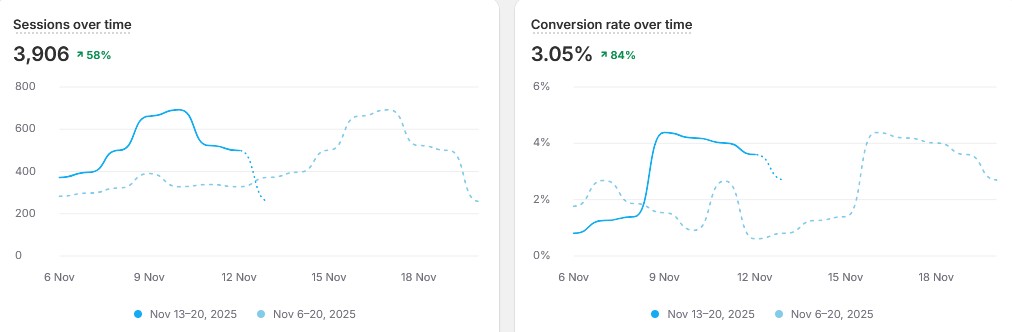
- Faster checkout & conversions → Shop Pay and the checkout flow are optimized and often convert better than WooCommerce.
- Scalability → when traffic spikes, Shopify handles it without you worrying about hosting.
- Ecosystem & support → Shopify apps, agencies, and experts are widely available.
⚠️ Things to be aware of
- Internationalisation → multi-currency and multi-language setups can be harder (though Shopify Markets has improved this).
- Custom checkout → customization is limited unless you’re on Shopify Plus. But you are better off not fiddling with the checkout process
- Ongoing costs → Shopify + apps + themes + add-ons can sometimes cost more per month than WooCommerce.
- Platform lock-in → unlike Woo (open source), Shopify is proprietary. If you leave, you can export data, but not the platform itself.
🎨 Favourite Shopify themes brand owners love
- Dawn (free) → great starter theme, fast and flexible with Online Store 2.0.
- Impulse (Archetype Themes) → very popular for established brands; strong merchandising tools.
- Prestige (Maestrooo) → premium look, strong for fashion/luxury.
- Flow → sleek, modern, excellent for storytelling.
- Warehouse → great for large catalogs.